Blog · · Tuckmade team
Tuck box artwork setup: bleed, safe area and the glue flap
How to set up tuck box artwork on a dieline: how far bleed runs past the cut, where the safe area sits, and why the glue flap stays bare.
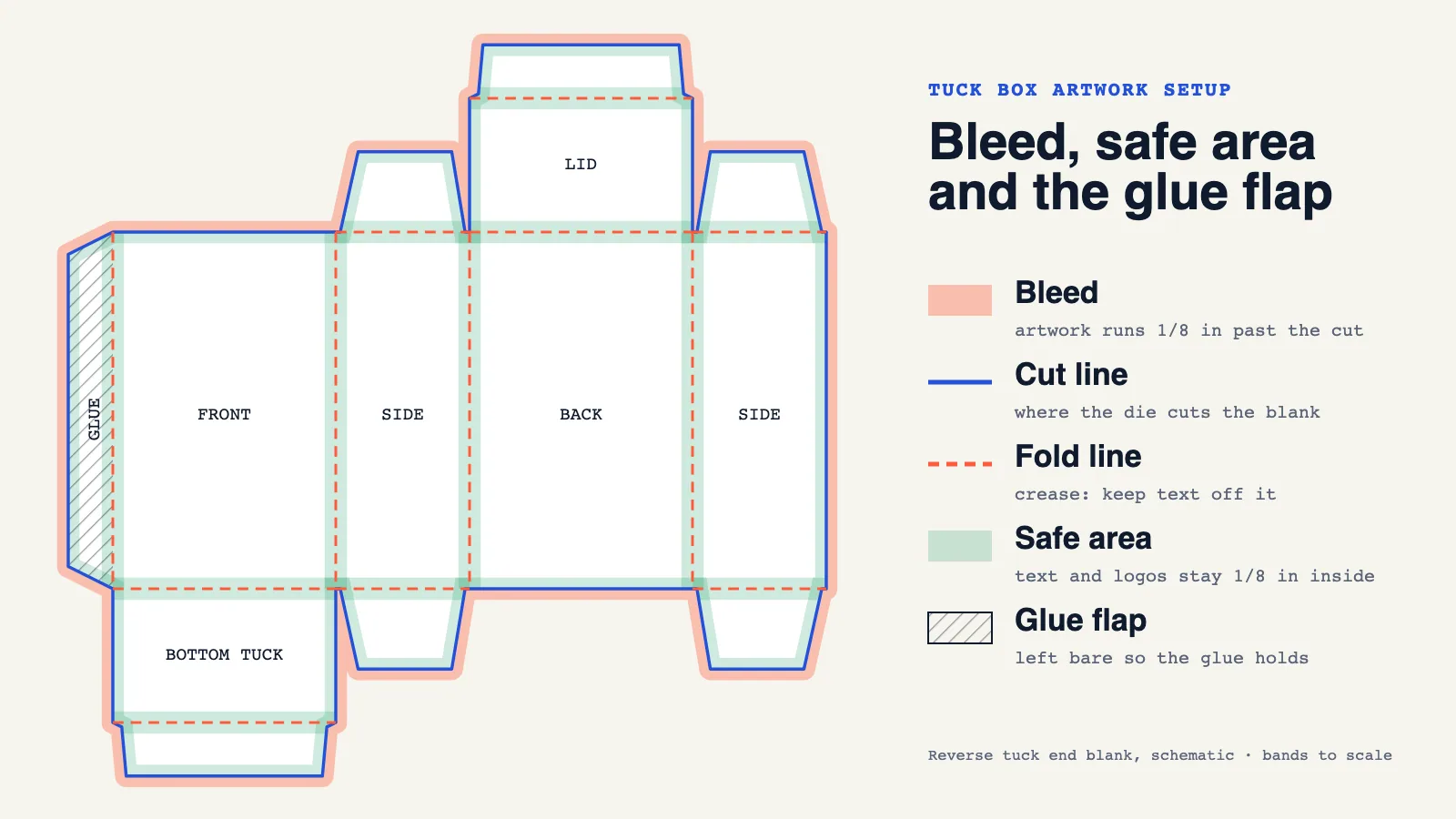
Set up tuck box artwork in three zones. Extend background colour and images about 1/8 in past every cut line (the bleed), keep text, logos and barcodes about 1/8 in inside every cut and fold (the safe area), and leave the glue flap free of ink so the side seam bonds to bare board.
Those three rules prevent most of the problems that show up on a first proof: a thin white sliver along an edge, a word that wraps around a fold, or a side seam that pops open. This guide walks through each zone on a real dieline, then covers the smaller checks that catch the rest.
What is a dieline, and why does artwork sit on it?
A dieline is the flat outline of the carton before it is folded. Solid lines show where the steel rule die cuts the board; dashed lines show where the board is creased so it folds. On a reverse tuck end box the blank has four body panels in a row (front, side, back, side), a narrow glue flap on one end, a lid with a tuck flap on top of the back panel, a bottom tuck on the front panel, and four small dust flaps.
Your artwork is placed on this flat shape. Every edge and fold in your design has to line up with a line on the dieline, which is why you should always design on the dieline for your exact size rather than on a generic template. Free planning dielines for the common tuck styles are on the dielines page, and the production dieline for your exact size comes with your proof.
How much bleed does a tuck box need?
Bleed is artwork that runs past the cut line on purpose. Die cutting has a small tolerance, so if a background colour stops exactly at the cut, any shift leaves a hairline of bare board along the edge. Running the colour past the cut means the die always lands inside printed area.
Common practice in the US is 1/8 in (0.125 in, about 3 mm) past every cut edge. Avery's template guidance, for example, asks for a bleed of 1/8 in over the edge for print-to-edge designs. Some carton printers ask for less: one European folding box printer specifies at least 2 mm beyond the die-cutting contour. If a printer gives you a figure, use theirs; 1/8 in is the safe default and is what Tuckmade asks for.
Two places people forget to add bleed on a tuck box:
- The tuck flap and dust flaps. They are small, but they are cut edges. If the inside of the lid shows a colour when the box is opened, extend it past the flap outline.
- The edge of the glue flap that meets the body panel. Artwork on the panel next to the glue flap should run onto the flap slightly (that edge is a fold, not a cut, but it is where the seam shows). Leave the rest of the flap bare, as explained below.
Where is the safe area on a tuck box?
The safe area is the zone inside the cut and fold lines where important content is protected from trimming and folding. Anything outside it can end up on an edge, around a corner or under a flap.
Keep text, logos, barcodes and small details at least 1/8 in inside every cut line and every fold line. The fold part is specific to cartons: a tuck box has more folds than cuts, and a line of text that crosses a crease cracks, distorts or wraps onto the next panel. The folding box printer quoted above uses 1.5 mm from the die-cutting contour as its minimum; 1/8 in gives more margin and is easy to set as a guide in your design tool.
Practical rules for the panels:
- Front panel: your main design. Keep the logo and product name well inside the folds on both sides.
- Side panels: narrow on most tuck boxes. Check that text set in a large size still fits inside the safe area at the real panel width.
- Back panel: usually carries ingredients, directions and the barcode. Barcodes need a clear quiet zone on each side, and should sit on a flat panel away from edges and folds so they scan cleanly.
- Tuck flap: it slides inside the box when closed, so treat it as hidden. Short messages printed there are seen only when the box is opened.
Why does the glue flap stay bare?
The glue flap is the narrow strip that is glued to the inside of the opposite panel to form the side seam. Glue bonds best to bare board. Ink, coating and lamination in the glue area can weaken the bond, so most printers knock out (leave unprinted) the glue zone. The European printer above states it plainly: gluing areas are not printed.
On the dieline the glue area is usually marked with hatching. Leave it white in your artwork file, or let the background stop at the fold between the glue flap and the panel and add only a small overlap. The printer handles the exact glue-free zone in prepress; your part is not to place content there.
Other checks before you send artwork
These are not zones, but they catch most of the remaining proof corrections.
| Check | What to do |
|---|---|
| Colour mode | Set the file up in CMYK for full-colour print. RGB files are converted, and bright greens and blues can shift. |
| Image resolution | Use images at 300 dpi at the size they print. |
| Fonts | Outline fonts, or send them with the file. |
| Small text | Keep fine text at a readable size; very thin lines and small reversed (white on colour) text can fill in. |
| Kraft board | Colours print darker on kraft paperboard. White ink underneath brings lighter colours back. |
| Panel order | Check which panel is the front after folding. Fold a printout of the dieline into a box to see it. |
The last check is the cheapest and most useful one: print the dieline at 100 percent with your artwork on it, cut it out, and fold it. Errors with panel orientation, upside-down text on the lid, or a logo that sits on a fold are obvious in a minute.
What Tuckmade checks on your proof
Every order gets a digital proof of your artwork placed on the production dieline for your exact size, and nothing prints until you approve it. On that proof we point out bleed that stops short of a cut edge, content outside the safe area, and anything placed on the glue flap. If you only have a logo, design help is free: send it through the quote form and we place it on the dieline with you.
The how it works page explains the full process, and the size guide shows how to measure your product so the dieline is drawn around it.
FAQ
How much bleed should a tuck box have?
Use 1/8 in (0.125 in, about 3 mm) past every cut edge unless your printer gives a different figure. Bleed applies to the body panels, the tuck flaps and the dust flaps, wherever artwork reaches a cut line.
Can I print on the glue flap?
Leave the glue area unprinted. Glue bonds best to bare board, and ink or coating in that zone can weaken the side seam. A small overlap of background colour at the fold between the flap and the panel is fine.
Does the safe area apply to fold lines too?
Yes. On a tuck box, keep text, logos and barcodes about 1/8 in away from every fold as well as every cut, so nothing cracks, wraps around a corner or ends up on the wrong panel.
Where should the barcode go on a tuck box?
Usually on the back panel, on a flat area clear of folds and edges, with the quiet zone on each side kept free of other artwork so it scans reliably.
Sources
- Avery, "What are the bleed and the safe areas?", read 31 Oct 2026: https://avery.com/help/article/what-are-the-bleed-and-the-safe-areas
- labelprint24, "Artwork requirements for folding boxes" (bleed of at least 2 mm, 1.5 mm from the die-cutting contour, gluing areas not printed, 300 dpi, CMYK), read 31 Oct 2026: https://www.labelprint24.com/en/data-check/artwork-requirements-for-folding-boxes-71
- TEKLYNX, "Barcode placement guidelines" (smooth surfaces, quiet zones, away from edges), read 31 Oct 2026: https://teklynx.com/en/blog/barcode-placement-guidelines